How can I create a contact on your website
- Creating a contact
- Login to your support portal
- Click on the New dropdown and select New Contact
- Fill in all the details of the contact in the contact form. The requirements for creating a new contact are listed below:
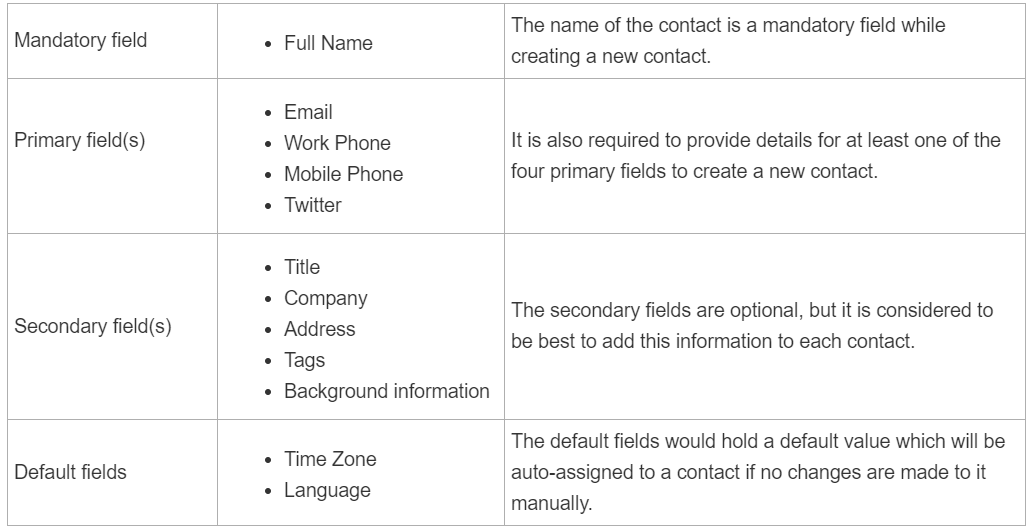
- The default fields would hold a default value which will be auto-assigned to a contact if no changes are made to it manually.
- Type in the contact's address, contact, social IDs, timezone, language, and other background information.
- If you are on the Premium or above plan, this feature can be used by clicking on the ticket icon against the associated company (multiple companies can be associated)
- Once you are done, click Save.
- A profile for the contact is now successfully added. Similarly, add as many contacts as needed.
- Once saved, the contact will receive a user activation email with a link to verify their contact and log into your customer portal.
아티클이 유용했나요?
훌륭합니다!
피드백을 제공해 주셔서 감사합니다.
도움이 되지 못해 죄송합니다!
피드백을 제공해 주셔서 감사합니다.
피드백 전송
소중한 의견을 수렴하여 아티클을 개선하도록 노력하겠습니다.